Building an AI Ops Agent: Human in the Loop with an Event Driven Agentic Architecture

The agent dashboard illustrating an agentic run as an event stream.
The full source code for the project discussed in this article is available on GitHub
Building on my previous ops agent project, I wanted to solve two fundamental problems.
Problem A: Unsupervised Agents Are Dangerous
My ops agent framework gives agents real power. They can execute shell commands and modify files. This is useful; an agent can genuinely debug and fix issues. But some of these calls are dangerous. An agent might run rm -rf on the wrong directory, or make a “fix” that breaks things worse.
The agent is acting unsupervised. It has no concept of “wait, let me think about this more carefully.”
The obvious solution is confirmation dialogs: ask the human before doing anything dangerous. But traditional confirmation dialogs have a problem. If you wait hours for approval, or the server restarts, you lose all context. The agent forgets what it was doing.
I needed agents that could propose dangerous actions, pause for human review, and resume after approval without losing state.
Problem B: Agent Execution State Is Ephemeral
In my previous agent, execution state lived in memory. The agent would query logs, read files, and propose a fix. But if the server restarted while waiting for approval, that pending tool call was gone. It was just a variable in the running process.
For operational tasks, I needed that execution state persisted.
Problem C: No Audit Trail
When agents execute tools autonomously, you need to know what happened. My previous agent had no record of what it did or why. If something went wrong, I couldn’t trace the agent’s reasoning or actions.
The answer required combining three patterns: event sourcing for durability and auditability, a state machine for control flow, and human-in-the-loop for safety.
An Example
Before diving into implementation, here’s what human-in-the-loop looks like in practice.
-
User submits: “The store-api is returning 500 errors. Fix it.”
-
Orchestrator delegates to log analyzer agent
-
Log analyzer queries Loki, finds error in
bookService.ts:12 -
Orchestrator delegates to coding agent with specific file
-
Coding agent reads file, proposes fix via
write_file -
Run suspends for human approval
-
Human reviews the diff, clicks “Approve”
-
File written, run completes with summary
The agents handled investigation, analysis, and solution design. The human just validated the file write.
This is the core idea: instead of fully automated execution, the agent pauses before dangerous operations and waits for human judgment. The agent does the tedious work; humans make the high-stakes decisions.
Durability
My previous agent kept everything in memory. It couldn’t safely suspend or recover from service interruptions:
-
Voluntary interruptions (waiting for approval) or involuntary ones (server restarts) cause the agent to lose its place
-
Complex work across multiple agents can’t be coordinated
I needed execution state persisted so the agent could pause, wait, and resume.
Event Sourcing
Event sourcing solves all three problems at once. Instead of storing current state, you store every action as an immutable event in a journal:
-
HITL: Record the proposed tool call as an event. The agent can suspend, wait for approval, and resume by replaying the journal.
-
Durability: Server restarts? Replay the events to reconstruct exactly where the agent left off.
-
Auditability: The journal is a complete history of everything the agent did.
Event Types
A run is modeled as a sequence of events. Each significant action gets its own event type:
| Event Type | Description |
|---|---|
RUN_STARTED | Agent begins processing |
AGENT_THOUGHT | LLM reasoning text |
TOOL_PROPOSED | Agent proposes an action |
RUN_SUSPENDED | Waiting for human |
RUN_RESUMED | Human decision recorded |
TOOL_RESULT | Action outcome |
CHILD_RUN_STARTED | Orchestrator delegates |
CHILD_RUN_COMPLETED | Sub-agent finished |
RUN_COMPLETED / RUN_CANCELLED / SYSTEM_ERROR | Terminal states |
State Machine
Every agent run follows a state machine:
stateDiagram-v2
    [*] --> pending : Run created
    pending --> running : RUN_STARTED
    pending --> cancelled : RUN_CANCELLED
    running --> suspended : RUN_SUSPENDED
    running --> completed : RUN_COMPLETED
    running --> failed : SYSTEM_ERROR
    running --> cancelled : RUN_CANCELLED
    suspended --> running : RUN_RESUMED
    suspended --> cancelled : RUN_CANCELLED
    completed --> [*]
    failed --> [*]
    cancelled --> [*]
Six states, clear transitions. The suspended state is where human oversight lives. The agent waits here until the user approves or rejects the proposed action.
Events drive state transitions. When we record RUN_SUSPENDED, the run moves to suspended. When we record RUN_RESUMED, it moves back to running. The state machine defines valid transitions, but events are the source of truth.
The Event Journal
Events are stored in an append-only journal. Here’s what a typical run looks like:
| Seq | Event Type | Payload |
|---|---|---|
| 1 | RUN_STARTED | { prompt: "Fix the bug" } |
| 2 | AGENT_THOUGHT | { text: "I'll check the logs..." } |
| 3 | TOOL_PROPOSED | { tool: "write_file", args: {...} } |
| 4 | RUN_SUSPENDED | { reason: "Dangerous tool" } |
| — waiting for human — | ||
| 5 | RUN_RESUMED | { decision: "approved" } |
| 6 | TOOL_RESULT | { output: "File written" } |
| 7 | RUN_COMPLETED | { summary: "Fixed the bug" } |
The journal is the single source of truth. To reconstruct current state or resume after a crash, replay the events.
The DurableLoop
The DurableLoop is the core execution engine. It runs the agent one step at a time, persisting state after each step.
Single-Step Execution
I use the Vercel AI SDK to interact with Claude. The SDK has a maxSteps parameter that controls how many LLM interactions happen before returning:
const result = await generateText({
  model: anthropic('claude-sonnet-4-20250514'),
  maxSteps: 1,  // Execute exactly ONE step
  system: systemPrompt,
  messages,
  tools: preparedTools,
});
Setting maxSteps: 1 means we get control back after every LLM response. After each step, we persist the agent’s thoughts and tool calls to the journal. If the server crashes, we replay the journal and continue from where we left off.
Tool Stripping
The Vercel AI SDK automatically executes tool functions when the LLM proposes them. This is convenient, but it’s a problem for HITL. I need to intercept dangerous tool calls before they execute.
The solution: strip the execute function from every tool before passing them to the SDK.
const executeFunctions = new Mapstring, Function>();

for (const [name, tool] of Object.entries(allTools)) {
  // Save execute function for later
  if (typeof tool.execute === 'function') {
    executeFunctions.set(name, tool.execute);
  }
  // Strip execute - SDK can't auto-run it now
  const { execute, ...rest } = tool;
  preparedTools[name] = rest;
}
Now the LLM can propose tools, but can’t execute them. I execute manually after checking if the tool is dangerous:
// Record TOOL_PROPOSED first
await journalService.appendEvent(runId, {
  type: 'TOOL_PROPOSED',
  payload: { tool_name, args, call_id },
});

if (isDangerousTool(tool_name)) {
  // Suspend and wait for human approval
  await journalService.appendEvent(runId, {
    type: 'RUN_SUSPENDED',
    payload: { reason: `Dangerous tool: ${tool_name}` },
  });
  return { needsApproval: true };
}

// Safe tool - execute immediately
const result = await executeFunctions.get(tool_name)(args);
await journalService.appendEvent(runId, {
  type: 'TOOL_RESULT',
  payload: { call_id, output_data: result },
});
Message Reconstruction
When the agent resumes, either after approval or after a server restart, we need to rebuild the conversation for the LLM. The projectToPrompt() function replays journal events into the message format the SDK expects:
-
AGENT_THOUGHT→ assistant message -
TOOL_PROPOSED→ tool call in assistant message -
TOOL_RESULT→ tool result message -
RUN_RESUMED(rejected) → user message with feedback
This is the core of event sourcing: state is derived by replaying events.
Parent-Child Coordination
The orchestrator agent delegates tasks to specialized sub-agents (coding agent, log analyzer). When a child agent proposes a dangerous tool, both runs need to coordinate:
-
Child proposes dangerous tool → child run suspends
-
Parent run also suspends, recording
blocked_by_child_run_id -
User approves → approval forwards to the child
-
Child executes and completes → parent resumes
The user only sees one approval dialog. The parent-child coordination happens behind the scenes.
The Dashboard
The event journal can power real-time user interfaces. The dashboard in this project is an illustration of that. When the user submits a task, they see events stream in as the agent works.
From CLI to Dashboard: Visualizing the Event Stream
I started out building this interface in the terminal using Ink. It worked for simple tasks, but as the logic got more complex, the terminal just became a difficult way to illustrate what was actually going on.
With event sourcing, I wanted to show thoughts streaming in, tools being proposed, and safety checks triggering. A standard terminal log flattened all that structure into a hard-to-read stream of text, making the agent’s reasoning difficult to follow.
To trust the agent, I needed to see its thought process clearly. Moving to a React dashboard let me visualize the event stream properly. I could separate the logs from the approval requests and see exactly where the agent was stuck, instead of fighting with ANSI codes.
Event Streaming
The JournalService uses an internal EventEmitter. When an event is appended, it’s both persisted to PostgreSQL and emitted to subscribers:
class JournalService {
  private emitter = new EventEmitter();

  async appendEvent(runId, event) {
    await this.entryRepository.save(event);
    this.emitter.emit(`run:${runId}`, event);
  }

  subscribe(runId, callback) {
    this.emitter.on(`run:${runId}`, callback);
    return () => this.emitter.off(`run:${runId}`, callback);
  }
}
The dashboard connects via Server-Sent Events (SSE). Events stream immediately, no polling.
The Approval UI
When a RUN_SUSPENDED event arrives, the dashboard shows an approval dialog:
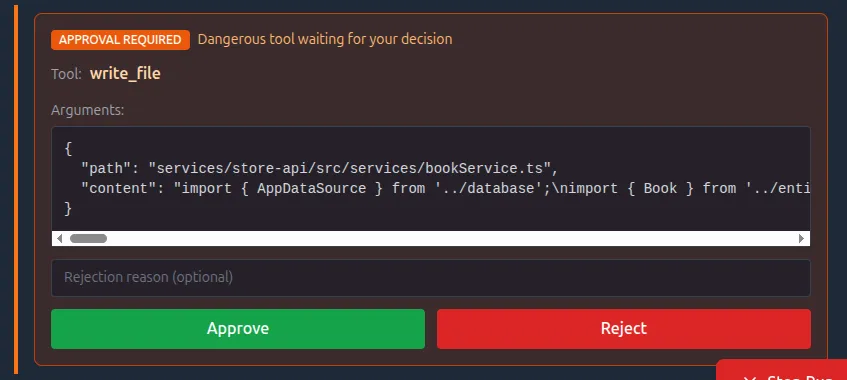
The dashboard approval dialog.
The user sees the tool name and arguments, and can approve or reject. On rejection, they can provide feedback that gets injected as a user message. The agent sees “Tool execution was rejected: [feedback]” and can reconsider its approach.
Limitations & Caveats
Tool Idempotency
This architecture doesn’t guarantee complete durability in all cases. If a crash occurs mid-tool-execution:
-
The tool executes
-
Server crashes
-
On restart, we replay events
-
Tool may re-execute
Tools must be written with care for idempotent replay:
-
write_fileis safe to replay (same content, same result) -
A hypothetical
send_emailtool would NOT be safe. Replaying it would spam duplicate emails.
This is true of all event-sourced systems. The solution is idempotency keys or using an async job pattern (i.e. return a job id immediately, then poll for status) so restarts just resume polling instead of re-triggering the work.
The Dual Write Problem
Journal events aren’t 100% accurate under disruption. If the server crashes after tool execution but before the event is recorded, the journal is incomplete.
For this application (dashboard visualization and HITL) that’s fine. But this architecture is NOT suitable for replicating events to a permanent store where accuracy is critical.
If you need true durability, use the Outbox Pattern or Change Data Capture (CDC).
Lessons Learned
The architecture is conceptually simple: store events, derive state, replay to resume. But the implementation isn’t trivial. The DurableLoop handles single-step execution, tool stripping, manual execution with proper event ordering, state machine transitions, parent-child coordination, message projection, resume forwarding, and error handling. All of these interact with each other.
Get the event ordering wrong, and the timeline is confusing. Get the resume forwarding wrong, and child approvals break. Get the projection wrong, and the LLM loses context.
It’s time to move to proven, hardened frameworks that handle this complexity for me. Mastra, LangGraph, Inngest AgentKit, and Temporal have already solved these edge cases.
What’s Next
I’m converting this project to use a framework for durable execution and step-persistence, as well as setting up OpenTelemetry for first-class observability. Then I’ll explore making the agent more autonomous while keeping human-in-the-loop for the decisions that matter. Stay tuned.
The full source code is available at github.com/tonyfosterdev/agentops. The key files are:
-
ops/packages/agent-server/src/services/DurableLoop.ts- Core execution loop -
ops/packages/agent-server/src/services/JournalService.ts- Event sourcing -
ops/packages/agent-server/src/types/journal.ts- Event type definitions -
ops/packages/dashboard/src/components/Timeline.tsx- Approval UI
